Logo
About us How it works Customers Plans FAQ Submit a request Sign in
What can we help you with?
  1. SignRequest
  2. SignRequest | Helpcenter and Support
  3. Preparing & Sending Documents

Add custom (default) subject line and message

September 08, 2022 08:54

You can manually change the subject line and message in the prepare view.
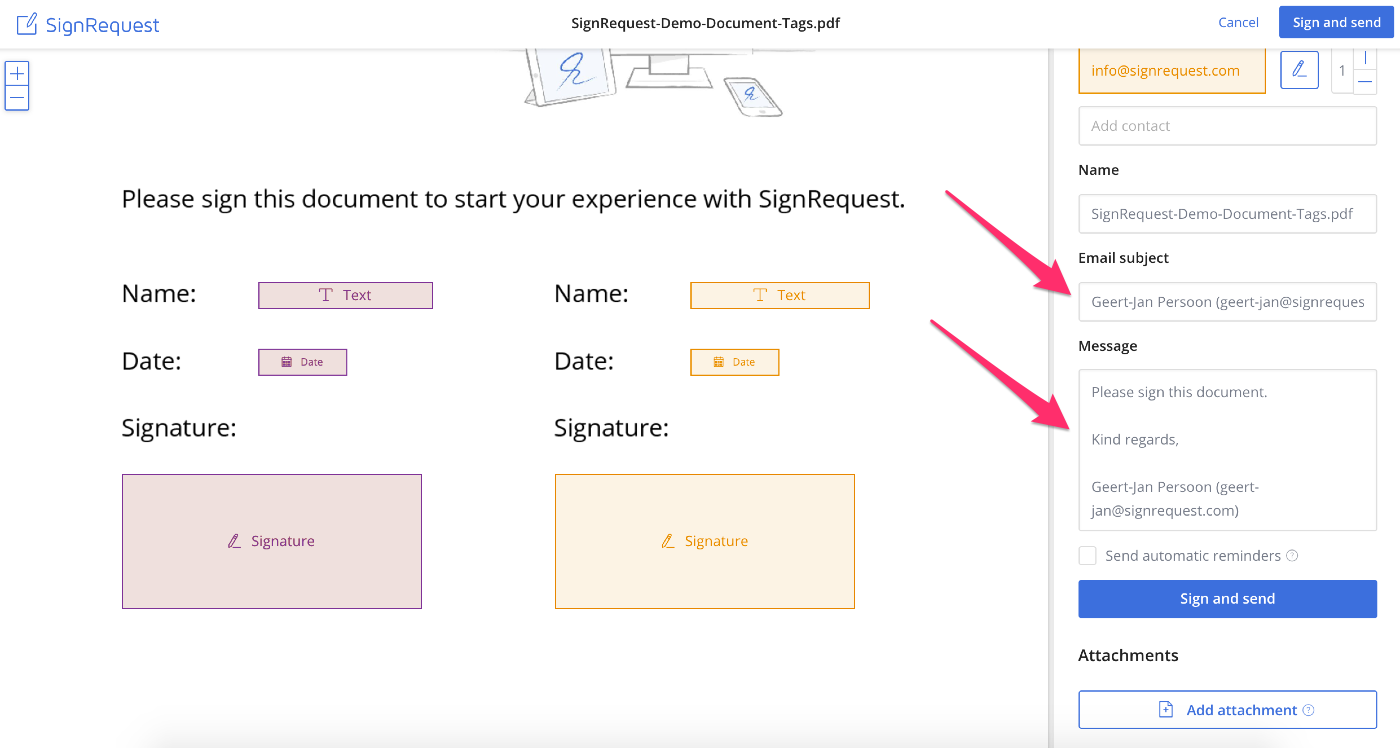
SignRequest-message-subject.png

If you've created a branded team account you can also change the default subject line and message.

Change_default_message.gif

Please have a look here.

Was this article helpful?
1 out of 4 found this helpful

Articles in this section

  • How to save a 'Contacts' email address within a template document
  • How to create templates?
  • How to create a Template with tags in a base document
  • How to easily resend a SignRequest
  • How can I send a SignRequest to someone if they do not have an email address?
  • Are "Radio Buttons" an available feature?
  • 2FA Methods for your signers
  • How to Create a Multi-Line Text Field for a Paragraph
  • What actions can be assigned to a contact?
  • Is it possible to edit the original document once uploaded to SignRequest?
See more

Can't find what you're looking for?

Let us help you!

Submit a request
Company

Home

About us

Benefits

Plans

Customers

Blog

Press

API

Integrations

Digital signature

Support

How it works

Legality

Security

FAQ

Contact

Privacy

Terms

SignRequest Best Software